.jpg)
.jpg)

Secure, Fast VPN for Global Privacy
Overview
Hotspot Shield VPN is a desktop application designed to provide secure, anonymous, and unrestricted internet access. It enables users to bypass geographic restrictions, protect personal data on public networks, and maintain privacy while browsing. The software is particularly useful for individuals seeking to access region-locked content such as streaming platforms, torrent clients, or websites blocked by ISPs or government policies. Its target audience includes privacy-conscious consumers, travelers, remote workers, and users who require secure access to online services across multiple devices.
Developed by AnchorFree, the application operates on a global network of over 2,500 servers across various countries, supporting fast and stable connections. The software is available in both free and premium versions, with the free tier offering limited speed compared to the paid offering. The application supports multiple platforms, including Windows, Mac, iOS, Android, Linux, and Amazon Fire TV, enabling cross-device synchronization. It also features a Google Chrome extension for browser-level encryption, enhancing usability for web-centric tasks.
Real-world use cases include accessing Netflix libraries from different regions, securely using public Wi-Fi in cafes or airports, protecting data during file sharing, and unblocking educational or news websites in restricted areas. The software’s ability to maintain low latency and prevent IP leaks makes it suitable for time-sensitive activities such as video conferencing or online gaming. The developer did not provide additional system requirements.
Key Features & Capabilities
- Global Server Network: Access over 2,500 servers across multiple countries to bypass geo-blocks and improve connection speed.
- Proprietary Hydra Protocol: Utilizes TLS 1.2 with AES-256 and AES-128 encryption, 2048-bit RSA certificates, and ECDHE for forward secrecy to secure data transmission.
- Automatic Kill Switch: Blocks internet access if the VPN connection drops, preventing IP leaks and maintaining privacy during interruptions.
- P2P and Torrent Support: Allows secure torrenting on all servers without bandwidth or data limits.
- Multi-Device Compatibility: Supports up to five devices per account, including Windows, Mac, iOS, Android, Linux, and smart TVs.
- Browser Extension: Offers a Google Chrome extension for encrypted browsing without affecting the entire system.
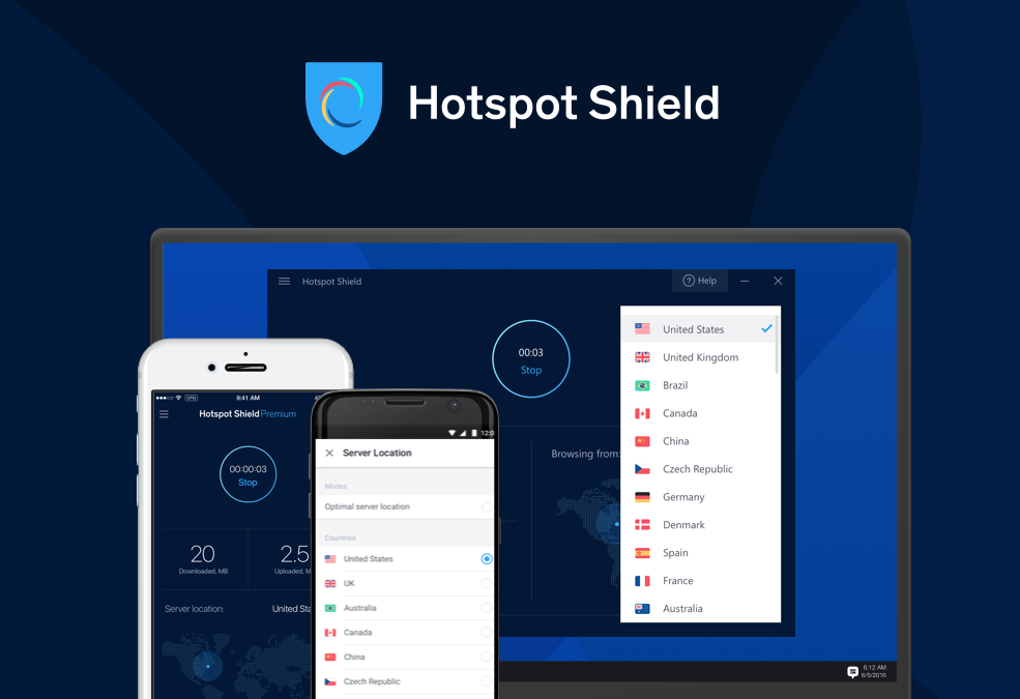
- Real-Time Connection Monitoring: Displays connection duration via an analog clock and allows scheduling or manual disconnection.
- Privacy-Focused Logging: Does not log IP addresses, device identifiers, or browsing activity in combination with user data.
These features enable users to securely access restricted content, protect sensitive information on public networks, and maintain consistent privacy across platforms. For example, a traveler in a foreign country can use the app to access home-region streaming services or bypass censorship. A remote worker can use it to securely connect to internal company resources. The software’s simple interface allows users to connect with a single click, making advanced security accessible to non-technical users.
User Interface, Workflow & Performance
The user interface of Hotspot Shield VPN follows a minimal, clean design focused on simplicity and quick access. The main screen features a large central button to connect or disconnect from the selected server, reducing cognitive load and enabling fast action. An analog clock displays the duration of the active connection, offering a visual cue for session length. Navigation is streamlined, with a single-page Settings menu that provides access to core preferences, though some features are restricted in the free version.
Workflow efficiency is high, as the application automatically connects to a preferred server upon system startup, identifying the last-used network to establish a secure link instantly. This behavior enhances usability for users who prioritize seamless, uninterrupted privacy. The software runs in the background with minimal impact on system resources, though exact performance details were not specified. Stability appears consistent, with no reported crashes or freezes in general usage scenarios.
Performance observations are based on general software behavior patterns. The application supports low-latency connections, which contribute to stable streaming and responsive browsing. However, the free version may exhibit slower speeds compared to the premium tier, as noted in the product description. The developer did not specify resource usage details such as CPU or RAM consumption.
Compatibility & System Requirements
Hotspot Shield VPN is compatible with Windows, Mac, iOS, Android, Linux, and Amazon Fire TV. The software is available as a desktop application and supports manual setup on routers via step-by-step guides provided on the official support site. It also includes a Google Chrome extension for browser-level encryption.
The installation size is 45.7 MB, which is relatively lightweight for a security-focused application. The software version is 10.0.0, released on June 15, 2024. The developer did not specify exact system requirements, including minimum CPU, RAM, or disk space needs. Compatibility information was partially provided, with no details on older operating system versions or hardware specifications.
Pros and Cons
Pros
- Fast, secure, and reliable connections with low latency
- Over 2,500 global servers for unrestricted access
- Supports up to five devices per account
- Effective kill switch to prevent IP leaks
- Free version available with no time or data limits
- Excellent unblocking capabilities for streaming platforms
- Simple, intuitive interface for all user levels
- Offers a Google Chrome extension for browser encryption
Cons
- Free version has slower speeds than the premium version
- Some advanced settings are restricted in the free tier
- Exact system requirements were not listed
- Proprietary protocol is not open source
- Logging of session duration and bandwidth usage may raise privacy concerns for strict users
FAQ Section
Is Hotspot Shield VPN safe to use?
Yes, Hotspot Shield VPN uses AES-256 encryption and a kill switch to protect user data. The privacy policy states that no identifiable browsing activity is logged, though session duration and bandwidth are recorded in anonymized form.
Can I use Hotspot Shield on multiple devices?
Yes, a single account supports up to five devices simultaneously across Windows, Mac, iOS, Android, Linux, and smart TVs.
Does Hotspot Shield support torrenting?
Yes, the software is P2P-friendly and allows secure torrent downloads on all servers without bandwidth or data restrictions.
Is there a free version available?
Yes, a free version is available with no time or data limits, though it may offer slower speeds compared to the premium version.
How often are updates released?
Updates are released periodically to improve performance, security, and compatibility. The latest version, 10.0.0, was released on June 15, 2024.
Final Thoughts + CTA
Hotspot Shield VPN stands out as a reliable, fast, and privacy-focused solution for users seeking unrestricted internet access. Its combination of global server coverage, low-latency connections, strong encryption, and multi-device support makes it ideal for travelers, remote workers, and streaming enthusiasts. The free version offers substantial functionality, allowing users to test the service without financial commitment.
While the free tier has reduced speeds, the core security features remain intact. The clean interface, automatic connection, and kill switch enhance usability and protection. For users prioritizing ease of use, strong privacy, and cross-platform compatibility, Hotspot Shield is a top-tier choice.
Download Hotspot Shield VPN now and take control of your online privacy today.







